Wednesday, April 11, 2018

Thursday, April 12th- 7th Grade- Finish Persuasive Presentations

Archdale-Trinity Middle School
Lesson Plan
Date: 04-12-2018


Teacher:
Witkowski

Lesson/Unit Topic:
Presentations- Review 10 Steps of a Multimedia Presentation and How to Make a Persuasive Presentation

Standards:
PB-1 Characteristics of Content- Appropriate and Inappropriate
PB-2 Procedure for developing a presentation


“I Can…” Statement
Criteria for Success-Formative/Summative Assessments
I can list items of a good persuasive presentation.
Students can list items of a good persuasive presentation.

Literacy/Vocabulary Strategies (Word Wall)

You can use a persuasive presentation to advertise 
so people will help a cause/charity or buy an item.
Lowcountry Red Cross Other resolutions: 180 × 240
https://www.flickr.com/photos/northcharleston/8534787636/                                 http://commons.wikimedia.org/wiki/File:Nike_shoes_2.jpg                         

Bell-Ringer/Connecting Strategy

  1. Go to wclassroom.blogspot.com
  2. SIT BY YOUR PROJECT PARTNERS
  3. Sign in to your project


Lesson-Instructional Strategies & Procedures for Teacher and Students
(Detailed Plans Including Best Practices, Researched Based Strategies)

Guided Lesson:

@ Miss W will review persuasive presentations rubric


@ Students will review the Persuasive Strategies Document


Independent Exercise

@ Students will finish their Persuasive PowerPoint 


This is a major project grade.
On Monday, we learned about persuasive presentations.
On Tuesday, we created storyboards
On Wednesday, we started the PowerPoint
On Thursday, we will finish the PowerPoint and start on the audio clips.
ALL project will be due before the end of Thursday's class.
USE YOUR TIME WISELY. 

@ Miss W will review how to use animation, shapes, borders, and special effects on PowerPoint.
-------------------------------------------------------------------------------------------------------------
ADDING AUDIO
@ Miss W will review audio clip instructions.
@ Each segment must be no longer than 20 seconds.
@ Each person on team must make an audio clip or you can record taking turns.

Tips for recording audio   

Headset WARNING:
No 2nd chances. Do NOT "play" with headset.
Do not throw, play with microphone, etc.
Look to the LEFT of the computer "on" button for USB ports

@Recording Audio in Microsoft Office PowerPoint 2010
  1 min review how to put on youtube     http://www.youtube.com/watch?v=8_WCAInVLrQ

Follow along with Miss W to add your audio clip
  1. go to the Slide Show tab
  2. choose Record Slide Show
  3. choose Start Recording from Beginning or Start Recording from Current slide


The Record Slide Show command
https://media.gcflearnfree.org/ctassets/topics/176/24_02_05_RecordSSDD.png


4. make sure both boxes are checked

5. when you are finished hit ESCAPE
6. We have now embedded an audio clip into your PowerPoint


Independent Exercise
@ Students will record their audio clips and save to their powerpoint
@ Students review the rubric to make sure they have ALL items


TEXT TO VOICE LINK save as a MP3  http://www.text2speech.org/

-----------------------------------------------------------------------------------------------
ADDING PICTURES FROM WEBCAM
1. PLUG CAMERA INTO USB PORT
2. On the Windows Start button, scroll up and choose camera

http://allprogramswindows10.com/wp-content/uploads/2017/11/all-pr-1--768x532.png

3. Aim webcam at what you want a picture of
4. Choose Insert Tab then Screenshot then Screen clipping


https://www.howtogeek.com/wp-content/uploads/2010/01/x5shot.png.pagespeed.gp+jp+jw+pj+ws+js+rj+rp+rw+ri+cp+md.ic.Rv3RiBygyy.jpg
5. Highlight the part of the picture you want on your presentation
6. There is not a way to get rid of the blue box
7. You can resize it. 


Higher Order Thinking Questions

How can you make your persuasive presentation more effective?

Student Technology/Differentiation

Students will use a video cam, Movie maker, and PowerPoint to create a persuasive presentation.

Closure Strategy


Exit Activity #10: 10 steps Matching Game (Easy)         

Exit Activity #11: 10 steps create a picture game- (Medium)
must complete picture within 2 attempts

Exit Activity #12:
Knowing the 10 steps (Hard).

Thursday, April 12th- 8th Grade- Food Truck Trends

Archdale-Trinity Middle School
Lesson Plan
Date: 04-12-2018


Teacher:
Witkowski

Lesson/Unit Topic:
The Entrepreneurial Process-
Discovery Phase

Standards:
NCCTE.BU20.03.02 Understand entrepreneurship and the entrepreneurial process


“I Can…” Statement

I can explain the different activities in the Discovery phase of the Entrepreneurial process.
.


Literacy/Vocabulary Strategies (Word Wall)
In the Discovery phase of the Entrepreneurial process 
you would research market trends about your idea.
Bell-Ringer/Connecting Strategy
      
     1.  Go to wclassroom.blogspot.com 
 
      2.   You need a pen or pencil

     3.   Open 3.02 Entrepreneurship and the Entrepreneurial Process
           Slide 33    
           
Lesson-Instructional Strategies and Procedures for Teacher and Students
(Detailed Plans Including Best Practices, Researched Based Strategies)
Guided Lesson: 

@ Students will learn about Market Trends.


https://www.prevention.com/sites/prevention.com/files/styles/listicle_main_custom_user_desktop_1x/public/nikemain.jpg?itok=tLYayI8R&timestamp=1511368344

ATMS Sneaker Trends

Brand:
52% Nike
16% Adidas
28% Vans
04% Other 

Color:
40% White
28% Black
12% Blue
12% Multi
08% Other


Food Truck Market Trends- For Starting a Business- https://www.youtube.com/watch?v=X4lG9B6glRM

Independent Exercise: 

Study food truck market trends "Food Trucks Motor into Mainstream" by Intuit at http://network.intuit.com/wp-content/uploads/2012/12/Intuit-Food-Trucks-Report.pdf

@ Complete the Food Truck Marketing Trends worksheet.

@ In YOUR OWN WORDS and using the facts from the worksheet,
write a paragraph (at least 6 sentences) about your AVERAGE customer.  


Previous Work:
@ In pairs, read the link below titled "Sneaker Wars" by the Washington Post
     and list different facts/trends about sneakers.
https://www.washingtonpost.com/news/business/wp/2015/03/17/how-sneaker-kings-are-fighting-to-win-the-war-for-americas-feet/


FOOD TRUCK SURVEY 
•You need to create a food truck survey. 
                 You may look at the 2 examples in the above links
                  or go online and google Food Truck Survey for ideas

•Use a word document.  ONE page only!
•Have 10 questions with correct spelling/grammar.  
                  The questions may be multiple choice or fill in the blank.
•Have clip art or pictures.
•Have your name & your food truck’s name on it.   
@ Students will take notes on the Discovery Phase.http://www.slideshare.net/afzaalali14/chapter-2-entrepreneurship-lecture-3 


Tuesday, April 10, 2018

Wednesday, April 11th Short Cut Links

Click here if you are a 8th Grade Student      https://wclassroom.blogspot.com/2018/04/wednesday-april-11th-8th-grade.html?_sm_au_=i5VRWSndjmDBkF7B

Click here if you are a 7th Grade Student      https://wclassroom.blogspot.com/2018/04/wednesday-april-11th-7th-grade-create.html?_sm_au_=i5VRWSndjmDBkF7B

Wednesday, April 11th- 7th Grade Start Persuasive PowerPoint

Archdale-Trinity Middle School
Lesson Plan
Date: 04-11-2018


Teacher:
Witkowski

Lesson/Unit Topic:
Presentations- Review 10 Steps of a Multimedia Presentation and How to Make a Persuasive Presentation

Standards:
PB-1 Characteristics of Content- Appropriate and Inappropriate
PB-2 Procedure for developing a presentation


“I Can…” Statement
Criteria for Success-Formative/Summative Assessments
I can list items of a good persuasive presentation.
Students can list items of a good persuasive presentation.

Literacy/Vocabulary Strategies (Word Wall)

You can use a persuasive presentation to advertise 
so people will help a cause/charity or buy an item.
Lowcountry Red Cross Other resolutions: 180 × 240
https://www.flickr.com/photos/northcharleston/8534787636/                                 http://commons.wikimedia.org/wiki/File:Nike_shoes_2.jpg                         

Bell-Ringer/Connecting Strategy

  1. Go to wclassroom.blogspot.com
  2. SIT BY YOUR PROJECT PARTNERS
  3. Decide who is here most of the time, and use their sign in to complete project


Lesson-Instructional Strategies & Procedures for Teacher and Students
(Detailed Plans Including Best Practices, Researched Based Strategies)

Guided Lesson:

@ Miss W will show samples of past students' persuasive presentations 


@ Students will review the Persuasive Strategies Document


Independent Exercise

@ Students will start on their Persuasive PowerPoint 

You do NOT record until Miss W. has approved your storyboard AND scripts!!!!!!!


@ Students will review the Persuasive Speech Rubric.

This is a major project grade.
On Monday, we learned about persuasive presentations.
On Tuesday, we created storyboards
On Wednesday, we will start the PowerPoint
On Thursday, we will finish the PowerPoint and start on the audio clips.
ALL project will be due before the end of Thursday's class.
USE YOUR TIME WISELY. 

@ Miss W will review how to use animation, shapes, borders, and special effects on PowerPoint.
@ Miss W will review audio clip instructions.
@ Each segment must be no longer than 20 seconds.
@ Each person on team must make an audio clip or you can record taking turns.

Tips for recording audio   

Headset WARNING:
MAKE SURE SOUND IS NOT ON MUTE AND IS TURNED UP HIGH
No 2nd chances. Do NOT "play" with headset.
Do not throw, play with microphone, etc.
Look to the LEFT of the computer "on" button for USB ports

@Recording Audio in Microsoft Office PowerPoint 2010
  1 min review how to put on youtube     http://www.youtube.com/watch?v=8_WCAInVLrQ

Follow along with Miss W to add your audio clip
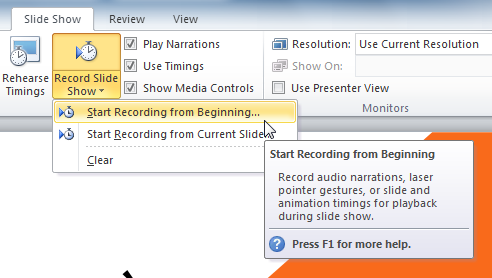
  1. go to the Slide Show tab
  2. choose Record Slide Show
  3. choose Start Recording from Beginning or Start Recording from Current slide
  4. make sure both boxes are checked
  5. when you are finished hit ESCAPE
  6. We have now embedded an audio clip into your PowerPoint

Independent Exercise
@ Students will record their audio clips and save to their powerpoint
@ Students review the rubric to make sure they have ALL items


TEXT TO VOICE LINK save as a MP3  http://www.text2speech.org/

Higher Order Thinking Questions

How can you make your persuasive presentation more effective?

Student Technology/Differentiation

Students will use a video cam, Movie maker, and PowerPoint to create a persuasive presentation.

Closure Strategy


Exit Activity #10: 10 steps Matching Game (Easy)         

Exit Activity #11: 10 steps create a picture game- (Medium)
must complete picture within 2 attempts

Exit Activity #12:
Knowing the 10 steps (Hard).