Click here if you are a 8th Grade Student http://wclassroom.blogspot.com/2017/08/thursday-august-31st-8th-grade-needs.html?_sm_au_=iVVL3jPLq11QjbFR
Click here if you are a 7th Grade Student http://wclassroom.blogspot.com/2017/08/thursday-august-31st-7th-grade-thesaurus.html?_sm_au_=iVVL3jPLq11QjbFR
Wednesday, August 30, 2017

Thursday, August 31st- 7th Grade- Thesaurus
Archdale-Trinity Middle School
Lesson Plan
| |
Date: 08-31-2017
|
Teacher:
|
Witkowski
| |
Lesson/Unit Topic:
|
Understanding Word formatting skills- Using the Thesaurus
| |
Standards:
|
Understanding Word formatting skills
|
“I Can…” Statement
| |
I can use the Thesaurus feature.
|
Literacy/Vocabulary Strategies (Word Wall)
| |||

Thesaurus the word processing feature that allows you to
find words with similar meanings (synonyms) for the text within a document. Click on the REVIEW Tab. | |||
Bell-Ringer/Connecting Strategy
| |||
1. Go to wclassroom.blogspot.com
2. Open a Word document.
Go to the applications folder
then click on Microsoft Office 2016 folder
then click on Word
| |||
Lesson-Instructional Strategies & Procedures for Teacher and Students
(Detailed Plans Including Best Practices, Researched Based Strategies)
| |||
Guided Lesson:
@ Miss W will demonstrate how to use the Thesaurus feature.
@ Miss W will show how to go to Google and type in
Adjectives that begin with
Independent Exercise
@ Students will use the Thesaurus feature to complete the Name exercise.
@ If time students will complete their Why Study assignment @ If time students will complete their Word Ribbon worksheet | |||
Closure Strategy
| |||
Exit Activity 1
|

Thursday, August 31st- 8th Grade Needs versus Wants
Archdale-Trinity Middle School
Lesson Plan
| |
Date: 08-31-2017
|
Teacher:
|
Witkowski
| |
Lesson/Unit Topic:
|
Purpose of Business- Needs versus Wants
| |
Standards:
|
NCCTE.BU20.01.01 Understand the purpose and the functions of business.
|
“I Can…” Statement
| |
I can decide between needs and wants.
|
.
|
Literacy/Vocabulary Strategies (Word Wall)
| ||||||
Discuss Word Wall
A need is something you need to survive. 
https://en.wikipedia.org/wiki/Flint_and_steel_fire
| ||||||
Bell-Ringer/Connecting Strategy
| ||||||
1. Go to wclassroom
2. Right Click on lower left Window button 3. Type FI then click on file explorer
4. Click on THIS PC twice
5. Click on Student Docs folder
6. Click on Witkowski 2017 folder
7. Click on Exploring Business folder
8. Click on the Business folder
9 Double Click on 1.01 Purpose of Business PowerPoint
| ||||||
Lesson-Instructional Strategies & Procedures for Teacher and Students
(Detailed Plans Including Best Practices, Researched Based Strategies)
| ||||||
Guided Lesson:
@ Needs vs Wants
@ Services vs. Goods https://www.youtube.com/watch?v=hriOz9yl-Ro
@ Why start a business?
@ Functions of a business
Independent Exercise:
@ Needs versus Wants Group Activity
| . | |||||
Was it easy or hard to get an agreement for your Needs vs. Wants project? Why?
|
Tuesday, August 29, 2017
Wednesday, August 30th- Short Cut Links
Click here if you are a 8th Grade Student http://wclassroom.blogspot.com/2017/08/wednesday-august-30th-8th-grade-why_29.html?_sm_au_=iVV3WHMmtRTWwRFM
Click here if you are a 7th Grade Student http://wclassroom.blogspot.com/2017/08/wednesday-august-30th-7th-grade-why.html?_sm_au_=iVV3WHMmtRTWwRFM
Click here if you are a 7th Grade Student http://wclassroom.blogspot.com/2017/08/wednesday-august-30th-7th-grade-why.html?_sm_au_=iVV3WHMmtRTWwRFM
Wednesday, August 30th- 7th Grade- Why Study?
Archdale-Trinity Middle School
Lesson Plan
| |
Date: 08-30-2017
|
Teacher:
|
Witkowski
| |
Lesson/Unit Topic:
|
Why Study?
| |
Standards:
|
2C Communicates high expectations for all students
|
“I Can…” Statement
| |
I can explain why I should study
|
.I can insert a text box
|
Literacy/Vocabulary Strategies (Word Wall)
|
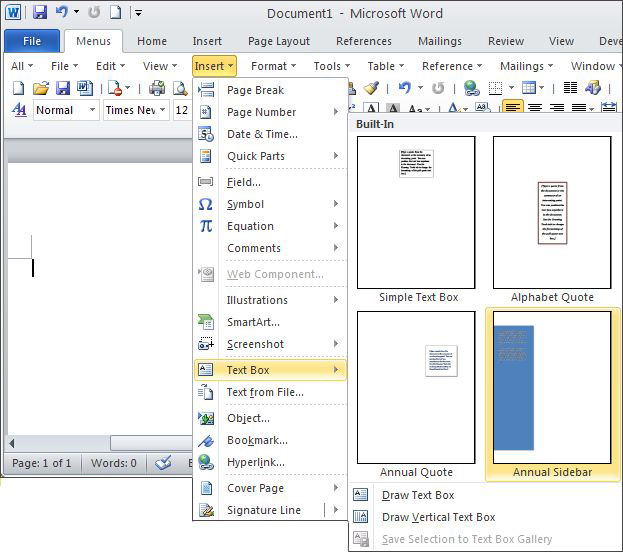 |
Bell-Ringer/Connecting Strategy
|
1. Open a Word document -
Go to Application folder- then MS Office folder- then click on Word 2016 software choose the Blank document 2. Go to wclassroom.blogspot.com |
Lesson-Instructional Strategies & Procedures for Teacher and Students
(Detailed Plans Including Best Practices, Researched Based Strategies)
|
Guided Lesson:
@Why Study? With a diploma from high school, you can expect to make around $652 weekly. Get your associate’s degree, and that weekly pay jumps to $785, according to the Bureau of Labor Statistics. College Bachelor’s degree holders earn about $53,000 per year, while those with master’s degrees earn even more.
@ Miss W will review how to copy and paste an image, copy the copyright information and how to insert a text box (it will allow you to move your images on the page.)
@ Miss W will explain how to save your document.
Independent Exercise:
@ Why study? activity
What would you do with your extra money?
Go to the Applications folder- then click MS Office folder- then click on Word software..
Type your first and last name in the header.
Find, copy and paste appropriate pictures of
the house you would like, the car you would like, hobbies you would do, places you would go, items you would like to have. You need at least 5 pictures. Insert a textbox to move your picture on the page. Make sure you copy the web addresses at the bottom of the page. @ If time students will complete their Word Ribbon worksheet |
|
Are you more motivated to study?
|
Wednesday, August 30th- 8th Grade- Why Study?
Archdale-Trinity Middle School
Lesson Plan
| |
Date: 08-30-2017
|
Teacher:
|
Witkowski
| |
Lesson/Unit Topic:
|
Why Study?
| |
Standards:
|
2C Communicates high expectations for all students
|
“I Can…” Statement
| |
I can explain why I should study
|
.I can insert a text box
|
Literacy/Vocabulary Strategies (Word Wall)
|
|
Bell-Ringer/Connecting Strategy
|
1. Open a Word document -
Go to Application folder- then MS Office folder- then click on Word 2016 software choose the Blank document 2. Go to wclassroom.blogspot.com |
Lesson-Instructional Strategies & Procedures for Teacher and Students
(Detailed Plans Including Best Practices, Researched Based Strategies)
|
Guided Lesson:
@Why Study? With a diploma from high school, you can expect to make around $652 weekly. Get your associate’s degree, and that weekly pay jumps to $785, according to the Bureau of Labor Statistics. College Bachelor’s degree holders earn about $53,000 per year, while those with master’s degrees earn even more.
@ Miss W will review how to copy and paste an image, copy the copyright information and how to insert a text box (it will allow you to move your images on the page.)
@ Miss W will explain how to save your document.
Independent Exercise:
@ Why study? activity
What would you do with your extra money?
Go to the Applications folder- then click MS Office folder- then click on Word software..
Type your first and last name in the header.
Find, copy and paste appropriate pictures of
the house you would like, the car you would like, hobbies you would do, places you would go, items you would like to have. You need at least 5 pictures. Insert a textbox to move your picture on the page. Make sure you copy the web addresses at the bottom of the page. |
|
Are you more motivated to study?
|
Monday, August 28, 2017
Tuesday, August 29th Short Cut Links
Click here if you are a 8th Grade Student http://wclassroom.blogspot.com/2017/08/tuesday-august-29th-8th-grade_28.html?_sm_au_=iVVB3PNk7dQLq27D
Click here if you are a 7th Grade Student http://wclassroom.blogspot.com/2017/08/tuesday-august-29th-7th-grade_28.html?_sm_au_=iVVB3PNk7dQLq27D
Click here if you are a 7th Grade Student http://wclassroom.blogspot.com/2017/08/tuesday-august-29th-7th-grade_28.html?_sm_au_=iVVB3PNk7dQLq27D
Subscribe to:
Posts (Atom)