Wednesday, September 6, 2017

Thursday, September 7th- 8th Grade- Finish IT, Review and start Marketing

Archdale-Trinity Middle School
Lesson Plan
 
Date: 09-07-2017


Teacher:
Witkowski

Lesson/Unit Topic:
Purpose of Business- Functions of Business- Information Technology versus Operations

Standards:
NCCTE.BU20.01.01 Understand the purpose and the functions of business.


“I Can…” Statement

I can name the different IT (Information Technology) activities
.


Literacy/Vocabulary Strategies (Word Wall)
Information Technology-
Uses technology to share knowledge, facts, and data to others (co-workers, customers, and suppliers)
Social media, who needs it?
https://www.jisc.ac.uk/news/social-media-who-needs-it-20-mar-2013
Bell-Ringer/Connecting Strategy
1. Go to wclassroom
2. Right Click on lower left Window button
3. Type   FI  then click on  file explorer 

4. Click on  THIS PC twice 

                      5. Click on Student Docs folder 
                      6. Click on  Witkowski 2017  folder 
                      7. Click on Exploring Business folder
                      8. Click on the Business folder
                      9  Double Click on 1.01 Purpose of Business PowerPoint.

Lesson-Instructional Strategies & Procedures for Teacher and Students
(Detailed Plans Including Best Practices, Researched Based Strategies)
Guided Lesson:
 What is Information Technology? How to use it in your academic life.

1. Comparing Sources of Information

Have you ever been frustrated trying to find something specific on the Internet? We all have used technology for fun but many of us stumble when we try to use technology as a practical tool.

Have you ever wondered what is the best way to pick the web site with the most useful information? Hint: It is usually not the first site that comes up.

2. Technology as a Tool

When you get an school assignment in high school or college how do you know which technology to use? Word Processing, Database, Spreadsheet, Graphic Organizer, Audio or Visual Recording, or online Collaboration Tools

3. Research Process

When it is time for you to buy your first car, where do you begin to search for information? When it is time to decide which college you would like to go to, how do you make the right choice? The Internet has millions of facts, how do you quickly find what you are looking for?

4. Safety and Ethical Issues

You have all heard of college students getting fined thousands of dollars for illegally copying music. Wouldn't you rather keep that money instead of losing it?

You have all heard of computers being infected with viruses. A few simple steps can protect you.


@ Technology Information function
@ Let's review Information Technology as it is used in businesses. (worksheet)


You may also code in an IT job. 
After clicking on the below link, choose the BLOCKS option
You may work together, but if you work by yourself,
you can get a certificate when you complete the Star Wars exercise.


https://code.org/starwars

@ Complete the Management and IT notes bubble page.


Coke Cola Marketing Campaign https://www.youtube.com/watch?v=2X8Bd3-G6IU

 
Independent Exercise
@ Marketing Function lesson
@ Sheetz       example https://www.youtube.com/watch?v=fQ2_wksYqVc
    Need or Want?

@ NCASRO Marketing assignment
@ Complete notes on Marketing 
 
@ If time Other Business examples

@ Operations function
@ Every business does not have the same Operation functions
@ Which ones do the Adventure Tourism company have? https://www.youtube.com/watch?v=M4Y2zOfPZDM
@ What type of Operations are needed to get vegetables to a grocery store? https://www.youtube.com/watch?v=f195qAUJJic
@ How many of you have bought something or your parents have bought something from Amazon.com? What type of Operations are needed at a Amazon.com warehouse? https://www.youtube.com/watch?v=Z2Bs0nqVyqs


Human Resources
  
Independent Exercise:
@ Complete Marketing worksheet
@ Complete definitions for Technology Information, Operations  and Human Resources
@ Turn In Function worksheet for grade


Exit Activity  
Finish any unfinished work.

Tuesday, September 5, 2017

Wednesday, September 6th Short Cut Links

Click here if you are a 8th Grade Student  http://wclassroom.blogspot.com/2017/09/wednesday-september-6th-8th-grade-it.html?_sm_au_=iVV6NjZ2M34fP56m

Click here if you are a 7th Grade Student  http://wclassroom.blogspot.com/2017/09/wednesday-september-6th-7th-grade-begin.html?_sm_au_=iVV6NjZ2M34fP56m

Wednesday, September 6th- 7th Grade- Begin Invitation

Archdale-Trinity Middle School
Lesson Plan
Date: 09-06-2017


Teacher:
Witkowski

Lesson/Unit Topic:
Understanding Word formatting skills- header, footer, paragraph formats

Standards:
Understanding Word formatting skills


“I Can…” Statement
Criteria for Success-Formative/Summative Assessments
I can create an invitation


Literacy/Vocabulary Strategies (Word Wall)


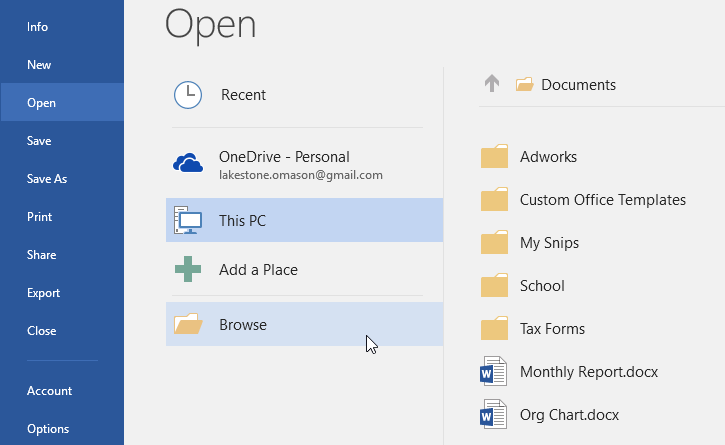
selecting Browse to look for a file to open


Bell-Ringer/Connecting Strategy

1. Open a Word document -
    Go to Application folder- 
    then MS Office folder- 
    then click on Word 2016 software
    choose the Blank document

2. Go to wclassroom.blogspot.com


Lesson-Instructional Strategies &Procedures for Teacher and Students
(Detailed Plans Including Best Practices, Researched Based Strategies)

Guided Lesson:

 Opening Paragraph Unit:
:                    
1.  Minimize anything open
2. Right Click on lower left Window button
3. Type   FI  then click on  file explorer 


                      4. Click on  THIS PC twice if needed
                      5. Scroll and Click on Student Docs folder 
                      6. Click on  Witkowski 2017  folder 
                      7. Click on Word Processing folder
                      8. Double Click on 1 Paragraph Formats PowerPoint

@ Miss W will explain several Word Vocabulary terms:
     @ Horizontal and vertical spacing- invitations
     @ Header- in the top margin
     @ Footer- in the bottom margin
     @ Block Paragraph- letters and memos
     @ Indented Paragraph- reports and books
     @ Hanging Indent Paragraph- bibliographies 
                           @ Tab- to indent for a paragraph
                           @ Backspace- to delete spaces or a tab 
                           @ Menu bar- used to format paragraphs
Independent Exercise
@ Explain about creative commons clip art
https://search.creativecommons.org/

@ Students will create an invitation by using horizontal and vertical centering
     - use block style format
     - use the header for clip art
     - use the footer for clip art
     - practice inserting a text box for vertical clip art

@ Students will work together on Exit Activity 1.


Higher Order Thinking Questions

How are documents formatted?

Student Technology/Differentiation

Students will format a Word document

Closure Strategy

Exit Activity 1  Paragraph formatting
http://www.quia.com/rr/1048604.html

Wednesday, September 6th- 8th Grade- IT, Information Technology Function

Archdale-Trinity Middle School
Lesson Plan
 
Date: 09-06-2017


Teacher:
Witkowski

Lesson/Unit Topic:
Purpose of Business- Functions of Business- Management

Standards:
NCCTE.BU20.01.01 Understand the purpose and the functions of business.


“I Can…” Statement

I can explain IT (information technology) activities
.


Literacy/Vocabulary Strategies (Word Wall)
IT (Information Technology)-  installs and maintains software and hardware,
keeps a company's computer network safe
Bell-Ringer/Connecting Strategy


1. Go to wclassroom

                      2. Get a pencil or pen (from the corner of desk if needed) 

Lesson-Instructional Strategies &Procedures for Teacher and Students
(Detailed Plans Including Best Practices, Researched Based Strategies)
Guided Lesson:

Get a pen or pencil.
Mr. Vinson will pass out article and worksheet package.

Independent Exercise
Students will read article. 

Students may work in groups BUT each person must complete a the worksheets.

The first worksheet is word for word.
I have listed which paragraph you will find the answer.


The second worksheet, you will need to reread the article. There are over 20 activities that an IT (information technology) worker can do to make their company safe. I have given you one example. You need to find 6 more examples.


Exit Activity  TBD based on time

Sunday, September 3, 2017

Tuesday, September 5th Short Cut Links

Click here if you are a 8th Grade Student   http://wclassroom.blogspot.com/2017/09/archdale-trinity-middle-school-lesson.html

Click here if you are a 7th Grade Student   http://wclassroom.blogspot.com/2017/09/tuesday-september-5th-7th-grade-review.html

Tuesday, September 5th- 7th Grade- Review Word Vocabulary Terms/Skills and Begin Paragraph Formatting

Archdale-Trinity Middle School
Lesson Plan
Date: 09-05-2017


Teacher:
Witkowski

Lesson/Unit Topic:
Understanding Word formatting skills- header, footer, paragraph formats

Standards:
Understanding Word formatting skills


“I Can…” Statement
Criteria for Success-Formative/Summative Assessments
I can format a paragraph


Literacy/Vocabulary Strategies (Word Wall)


selecting Browse to look for a file to open


Bell-Ringer/Connecting Strategy

1. Open a Word document -
    Go to Application folder- 
    then MS Office folder- 
    then click on Word 2016 software
    choose the Blank document

2. Go to wclassroom.blogspot.com


Lesson-Instructional Strategies &Procedures for Teacher and Students
(Detailed Plans Including Best Practices, Researched Based Strategies)

Guided Lesson:
https://www.gcflearnfree.org/word2016/text-basics/1/
Review Word Vocabulary Terms
footer
header
landscape
orientation
portrait
spell check
word processing

Opening Paragraph Unit:
:                    1.  Minimize anything open
2. Right Click on lower left Window button
3. Type   FI  then click on  file explorer 

                      4. Click on  THIS PC twice if needed
                      5. Scroll and Click on Student Docs folder 
                      6. Click on  Witkowski 2017  folder 
                      7. Click on Word Processing folder
                      8. Double Click on 1 Paragraph Formats PowerPoint

@ Miss W will explain several Word Vocabulary terms:
     @ Horizontal and vertical spacing- invitations
     @ Header- in the top margin
     @ Footer- in the bottom margin
     @ Block Paragraph- letters and memos
     @ Indented Paragraph- reports and books
     @ Hanging Indent Paragraph- bibliographies 
                           @ Tab- to indent for a paragraph
                           @ Backspace- to delete spaces or a tab 
                           @ Menu bar- used to format paragraphs
Independent Exercise
@ Explain about creative commons clip art
https://search.creativecommons.org/
If time:
@ Students will create an invitation by using horizontal and vertical centering
     - use block style format
     - use the header for clip art
     - use the footer for clip art
     - practice inserting a text box for vertical clip art
@ Students will work together on Exit Activity 1.


Higher Order Thinking Questions

How are documents formatted?

Student Technology/Differentiation

Students will format a Word document

Closure Strategy

Exit Activity 1  Paragraph formatting
http://www.quia.com/rr/1048604.html